
Simple Aweber Integration to WordPress | Horizontal Aweber Forms at end of posts

I am currently using Aweber for my email list building. One thing that I was really missing was a simple Aweber integration to WordPress. There are several plugins for sidebar widgets, but only for the sidebar.
I wanted a simple Aweber integration to add horizontal Aweber forms at end of WordPress posts. I could just go ahead and include this into my template file, but dealing with several client sites, I wanted something simpler and something I can share easily. I went ahead and created my own plugin: Simple Aweber Integration!

Simple Aweber Integration – Key Features

  • Automatically attach Aweber forms to WordPress pages or posts and choose whether at the beginning or end.
  • Choose a custom styling of your Aweber form: Original vertical Aweber form or a horizontal Aweber form.
  • Blend out certain Aweber form parts like header or footer.
  • Shortcode support for simple Aweber form integration into individual posts or pages.
  • Priority option to easily determine Aweber form display order.

Simple Aweber Integration – Result Showcase

Instead of just having the form available I created with Aweber:


I now have a very nice horizontal form that I can insert anywhere. It looks like this:

Both these forms were inserted with my plugin Simple Aweber Integration using short codes. Other styles are:

Not only that, but I can automatically add it to all WordPress post or pages choosing whether at the beginning or end. I am using Simple Aweber Integration to automatically add a horizontal Aweber form to the end of all posts on schurpf.com.

Simple Aweber Integration – Settings

Here is a screenshot from the Simple Aweber Integration’s settings page:
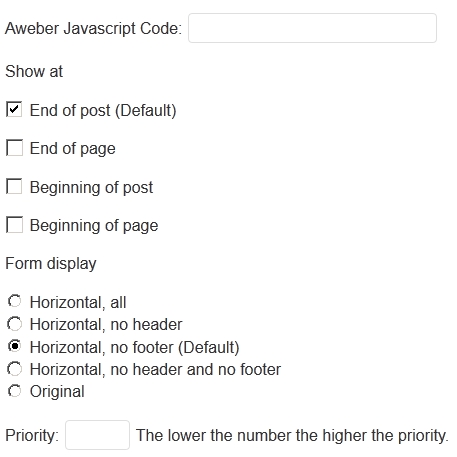
simple aweber integration settings1 Simple Aweber Integration to WordPress | Horizontal Aweber Forms at end of posts

Simple Aweber Integration – Get it for free

You can get the Simple Aweber Integration WordPress plugin for Free. Simply sign up for my newsletter and get it for free. Act now and get my Simple Aweber Integration WordPress plugin for FREE!

Simple Aweber Integration – Help

See the documentation and an installation guide on the Simple Aweber Integration Help page.

7 Responses to “Simple Aweber Integration to WordPress | Horizontal Aweber Forms at end of posts”

  1. Mikkel October 25, 2012 at 11:21 pm # Reply

    Looks and sounds great.

    I can’t believe that it has not been presented sooner as a solution for non-techies like me much earlier.

    Will your solution work with Infusionsoft also?

    And is it a plugin or is it code that needs to be installed?

    Thanks for replying

    Sincerely
    Mikkel

    • Schurpf October 25, 2012 at 11:38 pm # Reply

      Hi Mikkel,

      Simple Aweber Integration is a WordPress plugin that you can download and upload to your WordPress install.
      The only difference to other plugins is that you have to upload it yourself because the plugin is not
      hosted by WordPress. I am considering changing this in the future.

      To install:
      Plugins -> Add New -> Upload
      then pick location where you downloaded it
      voila
      configure to your likings

      I have never heard of Infusionsoft. But I dont see any reason why those two would collide.

      If you run into problems, let me know.

  2. jesse October 31, 2012 at 11:31 am # Reply

    Hi, It is not going to work with infusionsoft, because infusionsoft is a shopping cart +autoresponder and is a competitor (to an extent, it is more of a complete marketing platform)

    infusionsoft forms are different from aweber forms -so I do not believe it will be possible to use them with this plugin.

    Anyway, thanks for the great plugin! I think I will start using it today!

  3. Mark December 6, 2012 at 2:19 am # Reply

    Great plugin. Unfortunately, it does something that many plugins have been doing to my site.. and was wondering if you had any insight?

    I use Pagelines framework and this is probably the 10th plugin that breaks my wordpress css in IE8. If I deactivate, the site is back to normal. If I activate, it’s broken. It’s fine in Chrome and Firefox though.

    Any idea why this might happen? Most plugins are okay but several, like this one, just won’t work in IE8.

    Fantastic plugin though.. My problem is no doubt due to IE but just wasn’t sure what the cause could be.

    Thanks!

    • Schurpf December 6, 2012 at 2:46 am # Reply

      Hi Mark,

      thanks. Strange that it breaks IE8. Does the same thing happen if you just include the JS of Aweber in your WordPress template?
      Send me your website url via my contact form and I will take a quick look at it.
      Thanks for using my plugin either way and I very much appreciate your comment.

  4. Enrrico April 12, 2013 at 3:34 pm # Reply

    The plugin is Awesome. but it not showing on my MAC. I have checked in other computers there its showing ploperly.

    Please let me know what is Issue why its not working on my mac.

    Thanks,
    Enrrico.

  5. Enrrico April 12, 2013 at 3:35 pm # Reply

    The plugin is Awesome. but it not showing on my MAC. I have checked in other computers there its showing properly.

    Please let me know what is Issue why its not working on my mac.

    Thanks,
    Enrrico.

Leave a Reply